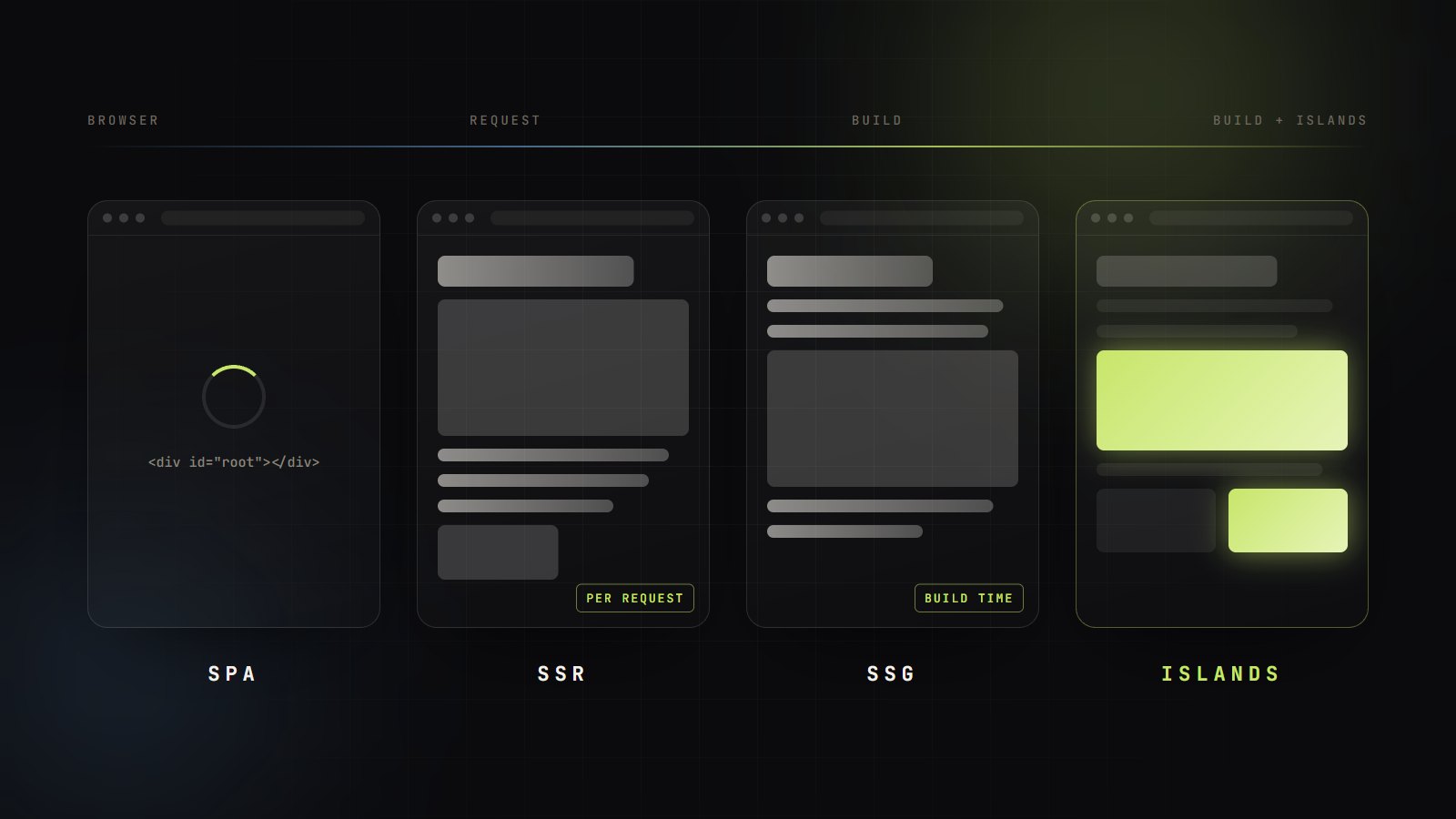
- The question is when and where HTML is made — at build, per request, at the edge or in the browser — and it can differ per route.
- AI crawlers raised the stakes for client rendering. Google renders JavaScript in a queued second pass; many AI crawlers do not run it at all.
- Core Web Vitals punish hydration, not just slow servers. LCP ≤ 2.5 s, INP ≤ 200 ms and CLS ≤ 0.1 at the 75th percentile are the targets.
- Static is the cheapest fast. Reach for SSR, streaming or edge rendering only when the HTML is genuinely per-user or must be fresh.
- A SPA can be made crawlable with build-time prerendering, per-route head tags and content that is never hidden behind a JavaScript animation.
For a decade the frontend architecture debate was framed as a fight between camps: single-page apps versus server rendering, React versus “just HTML”. In 2026 that framing is obsolete. Every serious framework now lets you choose a rendering strategy per route, and the strategies themselves have multiplied — static generation, incremental regeneration, streaming, Server Components, islands, edge rendering. The engineering question is no longer which camp to join, but which tool fits each page.
Two shifts make the choice more consequential than it used to be. First, Google's Core Web Vitals now include Interaction to Next Paint, which replaced First Input Delay in March 2024 and measures responsiveness across the whole visit — exactly where heavy hydration hurts. Second, a growing share of discovery happens through AI assistants whose crawlers, by the best public evidence, read your raw HTML and nothing else.
This guide compares the options on the axes that decide real projects: discoverability, Web Vitals, cost and team complexity. It ends with a decision matrix by app type and a practical section on making an existing SPA crawlable. It is the frontend companion to our piece on the backend paradigm shift, and it is the framework our web development team uses when scoping new builds and rescues.
The Rendering Spectrum, Explained
Every strategy answers two questions: when is HTML made, and where?
The clearest reference for the vocabulary is web.dev's Rendering on the Web. Stripped down, there are three places HTML can be produced — a build machine, a server, or the user's browser — and every named strategy is a combination of them.
Pick a strategy. Bars show the illustrative order of work, not measured timings. The code panel is the raw HTML a non-rendering crawler would get.
<body>
  <div id="root"></div>
  <script type="module" src="/assets/index-3f2a.js"></script>
</body>- Content in first HTML
- No — an empty mount point
- Main Web Vitals risk
- LCP waits on JS + data; INP grows with bundle
- Runtime cost
- Static files on a CDN
Client-side rendering (the classic SPA)
The server returns an almost empty HTML shell and a JavaScript bundle; the browser downloads it, fetches data and builds the DOM. Navigation afterwards is fast and stateful, which is why SPAs dominate dashboards and tools. The cost is that nothing meaningful exists until JavaScript has run, and web.dev notes that the bundle tends to grow with the app, which weighs on INP.
Server-side rendering and streaming
SSR renders the page to HTML on the server for each request and then hydrates it in the browser — re-running component code to attach event handlers and state. Content appears early, but time to first byte now depends on your slowest data call, and the client still pays for hydration. Streaming SSR sends the HTML in chunks: the shell and fast sections first, slower sections as their data resolves, so one slow query no longer holds the whole page hostage.
Static generation, prerendering and ISR
SSG renders every page at build time and serves files from a CDN — consistently fast TTFB and almost no runtime cost, but poor for personalised pages and slow to rebuild at large page counts. Prerendering is the SPA-flavoured version: run the client app at build time in a headless browser and save the resulting HTML. Incremental static regeneration adds a revalidation window: visitors get the cached page instantly while a fresh version regenerates in the background, with on-demand invalidation for content changes.
React Server Components
Server Components run ahead of time — at build or per request — and their code never enters the client bundle; only their output does. They can read data directly and cannot use state or effects; interactivity comes from Client Components marked with "use client". RSC is not a rendering timing like SSR or SSG; it is a way to decide, per component, which code ever reaches the browser. React's docs describe RSC as stable in React 19 while the lower-level bundler APIs may still change, which is why most teams adopt it through a framework rather than directly.
Islands and partial hydration
The islands architecture inverts the SPA default: the page is static HTML, and only marked components hydrate, each independently. Astro lets you choose when — on load, when the browser is idle, or when the component scrolls into view — and its server islands defer a personalised fragment so it never delays the static page around it. For content-led pages with a few widgets, it is the most direct way to keep JavaScript proportional to interactivity.
Edge rendering is a location, not a strategy
Running SSR on servers close to users shortens the network hop to the renderer. It does not move your database. If a page needs three queries against a single-region database, an edge renderer makes three long round trips instead of one long hop and three short ones. Edge rendering wins when the data is cached, replicated, or not needed — personalisation from a cookie, A/B assignment, geo-specific content. Our piece on AI at the edge covers the same trade-off for inference.
| Strategy | HTML is produced | Content without JS | Watch out for |
|---|---|---|---|
| SPA / CSR | In the browser, after JS runs | No | Blank first paint, soft 404s, crawlers that skip JS see nothing |
| Prerendered SPA | At build time, by running the SPA in a headless browser | Yes | Hydration mismatch, stale HTML, routes missing from the prerender list |
| SSR | On the server, per request | Yes | TTFB tied to data latency; hydration cost on the client |
| Streaming SSR | On the server, sent in chunks | Yes (shell first) | Layout shift when fallbacks resolve; proxies that buffer responses |
| React Server Components | On the server or at build; zero JS for server parts | Yes | Framework coupling; a new client/server boundary to reason about |
| SSG | At build time, one file per URL | Yes | Build time grows with page count; no per-user content |
| ISR | At build, then regenerated on a timer or event | Yes | Serving stale data; cache invalidation across instances |
| Islands | Static HTML; JS only for marked components | Yes | Cross-island state; awkward for app-like UIs |
| Edge rendering | SSR on servers near the user | Yes | Fast only if the data is near the user too |
SEO and AI-Crawler Discoverability
Google renders JavaScript eventually. Many AI crawlers never do.
Google is explicit about how it handles JavaScript. Its JavaScript SEO basics describe three phases — crawling, rendering and indexing — with pages queued for rendering in headless Chromium, where they may wait a few seconds or longer. Rendered output is then parsed again for links. Client-rendered content does get indexed, but it depends on a second, deferred step. The same guide still calls server-side rendering or prerendering a great idea, because it is faster for users and crawlers and because not all bots can run JavaScript.
That last clause now matters more than it did. In an analysis of crawler traffic across its network published in December 2024, Vercel reported that none of the major AI crawlers it observed rendered JavaScript. OpenAI's and Anthropic's crawlers fetched JavaScript files without executing them. The exceptions were Gemini, which rides on Googlebot's infrastructure, and AppleBot, which uses a browser-based crawler.
The rules that trip up client-rendered sites
- Links must be real links. Google only discovers <a> elements with an href. Hash-fragment routes like /#/pricing cannot be resolved reliably — use real paths and the History API.
- Soft 404s are the SPA default. A client router returns HTTP 200 for every path, including missing ones. Google recommends redirecting to a URL that returns a real 404, or adding a noindex robots tag to error views.
- Canonicals belong in the HTML. Google's guidance is to set rel=canonical in the initial HTML; if JavaScript must set it, it should match the original, and a page should carry only one.
- Don't count on JavaScript to remove noindex. If the initial HTML says noindex, Google may skip rendering entirely, so a script that later removes it may never run.
Core Web Vitals by Rendering Strategy
What each architecture does to LCP, INP and CLS
Google's recommended thresholds are measured at the 75th percentile of page loads, segmented by mobile and desktop. A page passes only when most real users get a good experience on all three.
LCP: where does the biggest element come from?
With server, static or prerendered HTML, the hero text or image is in the first response and the browser can paint it as soon as CSS allows. With client rendering, LCP cannot happen until the bundle has downloaded, executed and usually fetched data — three sequential steps on the critical path. Streaming helps SSR by letting the shell and hero arrive before slow sections.
INP: hydration is the hidden tax
Server rendering does not make a page responsive; hydration does, and hydration is main-thread work. web.dev warns that hydrated pages can look ready while they cannot yet respond to input, and that the work is effectively done twice — once on the server, again on the client.
One app for the price of two.
This is why the newest strategies all attack hydration rather than rendering speed. Islands hydrate only marked components, and can wait until they are visible. Server Components never hydrate at all. Streaming with progressive hydration spreads the work out so no single long task blocks a tap. If your INP is poor on a server-rendered site, look at how much JavaScript you hydrate before you look at the server.
CLS: late content moves things
Layout shift comes from content that arrives after first paint without reserved space: client-fetched blocks, streamed sections replacing fallbacks of a different height, ads, web fonts and images without dimensions. Every strategy can pass CLS; the discipline is the same — reserve space with explicit width and height or aspect-ratio, and make skeletons the size of what they stand in for.
Cost and Complexity
Where the bill comes from, and who has to be on call for it
Rendering strategy is also an infrastructure decision. Static output is files on a CDN: cheap, cacheable, and very hard to take down. Request-time rendering is a running service with capacity planning, cold starts, timeouts and logs — the server half of the trade we explore in The Backend Paradigm Shift. The table below is our qualitative engineering assessment, not a pricing benchmark; actual costs depend heavily on your platform and cache hit rates.
| Strategy | Runs on | Cost scales with | Operational burden |
|---|---|---|---|
| SPA / CSR | CDN + an API | Bandwidth; the device does the rendering | Low infrastructure; high client-performance discipline |
| SSG / prerender | CDN + a build pipeline | Number of pages × build frequency | Low; build times are the thing to watch |
| ISR | Framework runtime + shared cache | Cache misses and regenerations | Medium; cache coherence across instances |
| SSR / streaming | Always-on or serverless compute | Requests × render cost | Higher; capacity, cold starts, server observability |
| Islands | CDN, optional server | Mostly bandwidth | Low; per-component hydration choices |
Complexity is a team cost, too
Hybrid frameworks are powerful because they mix strategies per route — and every mix is something the team must understand. Server/client boundaries, caching semantics, revalidation and hydration mismatches are new failure classes that a plain SPA or a static site simply does not have. Next.js's own ISR documentation, for example, notes that its default file-system cache is per instance, so on-demand revalidation on one server does not invalidate the others without a shared cache handler. Choose the least complex architecture that meets the route's needs, not the most capable one available.
The Decision Matrix by App Type
Defaults we would start from, and what to avoid
Most products are not one app type; they are several sharing a domain. A typical SaaS company has a marketing site, docs, a blog and an authenticated app — four different answers. Pick per surface, and choose the framework that can host those answers, not the one the team happens to be loyal to (we made that argument at length in The Death of Framework Loyalty).
| App type | Default | Add where needed | Avoid |
|---|---|---|---|
| Marketing site | SSG + islands | ISR or server islands for pricing, stock or geo bits | Pure CSR for public pages |
| Content site, docs, blog | SSG; ISR at large page counts | Islands for search, comments, demos | Per-request SSR without caching |
| E-commerce | Hybrid: ISR for catalogue, streaming SSR for cart and account | RSC to keep product UI JS small; edge cache for listings | CSR product pages; uncached SSR on every PDP view |
| SaaS dashboard (behind login) | SPA / CSR | SSR or a static shell for first paint; prerendered public pages | SSR everywhere just for SEO that cannot apply |
| Existing SPA that needs SEO | Build-time prerender of public routes | Per-route head tags; migrate hot routes to SSG/SSR later | Dynamic rendering for bots only |
Five questions that decide a route
- Does it need to be found? If the route is behind a login, SEO and AI discoverability are irrelevant — optimise for interaction speed, and a SPA is fine.
- Is the HTML the same for everyone? If yes, render it ahead of time (SSG or ISR). If only a fragment is personal, keep the page static and isolate that fragment as an island or streamed section.
- How fresh must it be? Deploy-fresh → SSG. Minutes-fresh → ISR with on-demand revalidation. Second-fresh or per-user → SSR or streaming.
- How much of it is interactive? A few widgets → islands. App-like with shared state → SPA or Server Components plus client components.
- Where does its data live? Single-region database → render near the data. Cached or cookie-derived data → edge rendering can help.
Making a SPA Crawlable
Engineering lessons for teams that are not ready to change frameworks
Plenty of production apps are Vite or Create-React-App SPAs with a marketing site and blog bolted on. Rewriting them is rarely the first move. The highest-leverage fix is to make the public routes produce real HTML at build time, and to treat that HTML as a contract the build can fail on. These are the lessons that matter most.
1. Prerender every public route at build time
Serve the built app locally, visit each public route in a headless browser, and save the rendered DOM as dist/<route>/index.html. Most static hosts serve that file for the clean URL automatically. Two details separate a working setup from a flaky one: derive the route list from the same sitemap you submit to search engines, so a page cannot be listed but not prerendered, and run SEO assertions during the prerender so a broken page fails the build instead of the crawl.
// prerender.mjs — run after `vite build`import { mkdir, readFile, writeFile } from "node:fs/promises";import path from "node:path";import puppeteer from "puppeteer";import { preview } from "vite"; const ORIGIN = "https://www.example.com"; // 1. The sitemap is the single source of truth for public routesconst xml = await readFile("public/sitemap.xml", "utf8");const routes = [...xml.matchAll(/<loc>(.*?)<\/loc>/g)] .map((m) => new URL(m[1]).pathname) // write "/" last: dist/index.html is still the SPA fallback shell .sort((a, b) => (a === "/") - (b === "/")); const server = await preview({ preview: { port: 4173, strictPort: true } });const browser = await puppeteer.launch(); try { for (const route of routes) { const page = await browser.newPage(); await page.goto(`http://localhost:4173${route}`, { waitUntil: "networkidle0" }); // 2. Fail the build, not the crawl const audit = await page.evaluate(() => ({ h1: document.querySelectorAll("h1").length, canonicals: [...document.querySelectorAll('link[rel="canonical"]')].map((l) => l.href), title: document.title, })); const expected = new URL(route, ORIGIN).href; if (audit.h1 !== 1 || !audit.title || audit.canonicals.join() !== expected) { throw new Error(`${route} failed SEO audit: ${JSON.stringify(audit)}`); } const html = await page.evaluate(() => document.documentElement.outerHTML); const file = path.join("dist", route, "index.html"); await mkdir(path.dirname(file), { recursive: true }); await writeFile(file, `<!doctype html>\n${html}`); await page.close(); }} finally { await browser.close(); server.httpServer.close();}2. Give every route its own head tags
A SPA's index.html usually carries the site default title and, often, a homepage canonical. Prerender that as-is and every page tells search engines it is a duplicate of the homepage. Each route needs its own title, description and a single absolute, self-referencing canonical in the saved HTML. React 19 can render <title> and <meta> tags from inside components and place them in the document head, which makes per-route ownership straightforward.
// React 19 hoists <title>, <meta> and <link> into <head>// from anywhere in the tree, so each route owns its own tags.const ORIGIN = "https://www.example.com"; export function RouteHead({ title, description, path }) { const url = new URL(path, ORIGIN).href; return ( <> {/* one string child: `${a} | ${b}`, not {a} | {b} */} <title>{`${title} | Example`}</title> <meta name="description" content={description} /> <link rel="canonical" href={url} /> <meta property="og:url" content={url} /> </> );} // index.html must NOT ship its own canonical, or every// prerendered page ends up with two that disagree.3. Never hide content behind a JavaScript animation
This one is easy to miss because the site looks perfect in a browser. Animation libraries that start elements at opacity: 0 and animate them in on mount or on scroll write that starting style into the DOM — and the prerender faithfully saves it. The text is in the HTML, but it is invisible until JavaScript loads and runs the animation. For anyone whose script fails or is slow, the headline is blank; for LCP, an opacity-0 element is not a candidate at all. Put entrance effects in CSS, make the visible state the default, and let the motion be an enhancement.
/* Content is visible by default. Motion is an enhancement, never a gate. */.reveal { opacity: 1; } @supports (animation-timeline: view()) { @media (prefers-reduced-motion: no-preference) { .reveal { animation: rise linear both; animation-timeline: view(); animation-range: entry 0% entry 35%; } }} @keyframes rise { from { opacity: 0; transform: translateY(24px); }} /* Never put .reveal on the H1, hero image or intro: they are LCP candidates. */4. Verify what a crawler actually receives
Browser DevTools show the DOM after JavaScript; crawlers that do not render see only the response body. Check the latter directly, for a sample of routes, after every deploy. For the Google side, the URL Inspection tool in Search Console shows the rendered HTML Googlebot produced.
# What a crawler that does not run JavaScript receivesURL="https://www.example.com/blog/some-post"curl -s "$URL" > raw.html grep -o "<h1" raw.html | wc -l # expect 1grep -o '<link rel="canonical"[^>]*>' raw.html # expect one, absolute, self-referencinggrep -o "<title>[^<]*</title>" raw.html # expect the page title, not the site defaultgrep -o 'style="opacity:0' raw.html | wc -l # expect 0 for above-the-fold contentThe crawlable-SPA checklist
- Real URLs and real links. History API routing, <a href> for every navigable item, no hash routes.
- One source of truth for routes. The sitemap drives the prerender list; a route missing from one is missing from both.
- Per-route head in the saved HTML. Unique title and description, one absolute self-referencing canonical, Open Graph tags, structured data where it applies.
- Honest status codes. Unknown paths resolve to a real 404 page or carry noindex — never a 200 copy of the homepage.
- Visible by default. H1, intro and hero render without JavaScript animation; motion is layered on with CSS.
- Asserted in CI. The build fails if a public route lacks a title, has zero or several H1s, or has the wrong canonical.
A Decision Playbook
How we take a product from one rendering mode to the right mix
Architecture decisions age. A route that was a static landing page becomes a personalised hub; a dashboard grows a public share view. This is the sequence we use to choose — and to revisit — a rendering strategy on client engagements.
- Step 01
Inventory routes by audience
List every route and tag it: public and indexable, public but noindex, or authenticated. Rendering only matters for SEO on the first group, and that group is usually smaller than the team assumes.
- Step 02
Default to static, earn request-time rendering
Start each public route as static. Move it to ISR when the content changes faster than you deploy, and to SSR or streaming only when the HTML is genuinely per-user or must be fresh to the second.
- Step 03
Budget the JavaScript, not just the bytes
Decide which components must be interactive. Everything else should ship as HTML — via islands, Server Components, or simply not hydrating it. Measure INP on a mid-range phone, not your laptop.
- Step 04
Make the HTML a tested contract
In CI, fetch the raw HTML of every public route and assert one H1, a non-empty title, exactly one self-referencing canonical, and the main text present without JavaScript.
- Step 05
Decide with field data
Lab scores guide; field data at the 75th percentile decides. Watch CrUX or your own RUM per route type, and revisit the strategy when a route's traffic or freshness needs change.
HTML First, JavaScript Where It Earns Its Place
The SPA-versus-SSR argument was always a proxy for a simpler question: how much work should the user's device do before it can show and use your page? In 2026 the answer has sharpened. Search engines index rendered HTML on a delay, AI crawlers may read only the raw response, and Core Web Vitals now measure the cost of every hydrated component for the whole visit.
So decide per route. Prerender or statically generate what is the same for everyone, regenerate what changes, render on the server only what is personal or live, and keep the SPA for the authenticated app where it shines. Then ship JavaScript only to the parts that move. The framework you use to do that matters far less than the discipline of checking what your HTML actually says.
Frequently Asked Questions
What teams ask before choosing a rendering strategy
"use client" hydrate.Choosing an architecture, or rescuing a SPA that search can't see?
We audit your routes, pick the rendering strategy each one needs, and ship it with Web Vitals monitoring and crawlability checks built into the pipeline.


